La hoja de ruta, revisada
A principios del verano apunté cuatro próximos pasos para RedCheck. Cuatro meses después, tres se han publicado, ninguno como lo planeé, y el cuarto está más cerca de lo que parece.
At the start of the summer, with RedCheck freshly live (part 6), I wrote down what would come next. Four lines, each with a one-sentence description:
- A native mobile app: iOS and Android clients reusing the REST API.
- Push notifications: alerts for tasks about to be due.
- Cron expressions: an engine for complex, custom recurrence patterns.
- Preventive AI: predicting bottlenecks from the history of daily performance.
It’s October. Looking back at that list is more interesting than I expected, because almost everything on it happened, and almost nothing happened the way it was written.
| Planned in June | What actually happened |
|---|---|
| Native iOS and Android apps | An installable web app with native gestures |
| Push notifications | Reminders while the app is open |
| Arbitrary cron expressions | A deliberately restricted cron, plus one case by hand |
| Preventive AI from the heatmap | Not built yet, but its data now exists |
A native app became a web app that feels native
The plan assumed that “mobile” meant native. The REST API was already separate from the interface, so a native client seemed like the natural next step: same backend, new frontend.
What changed my mind was counting the cost. Two native apps means two more codebases, two app store reviews, and every release waiting on someone else’s approval. A progressive web app is one codebase, deployed the moment I push, and installable from the browser.
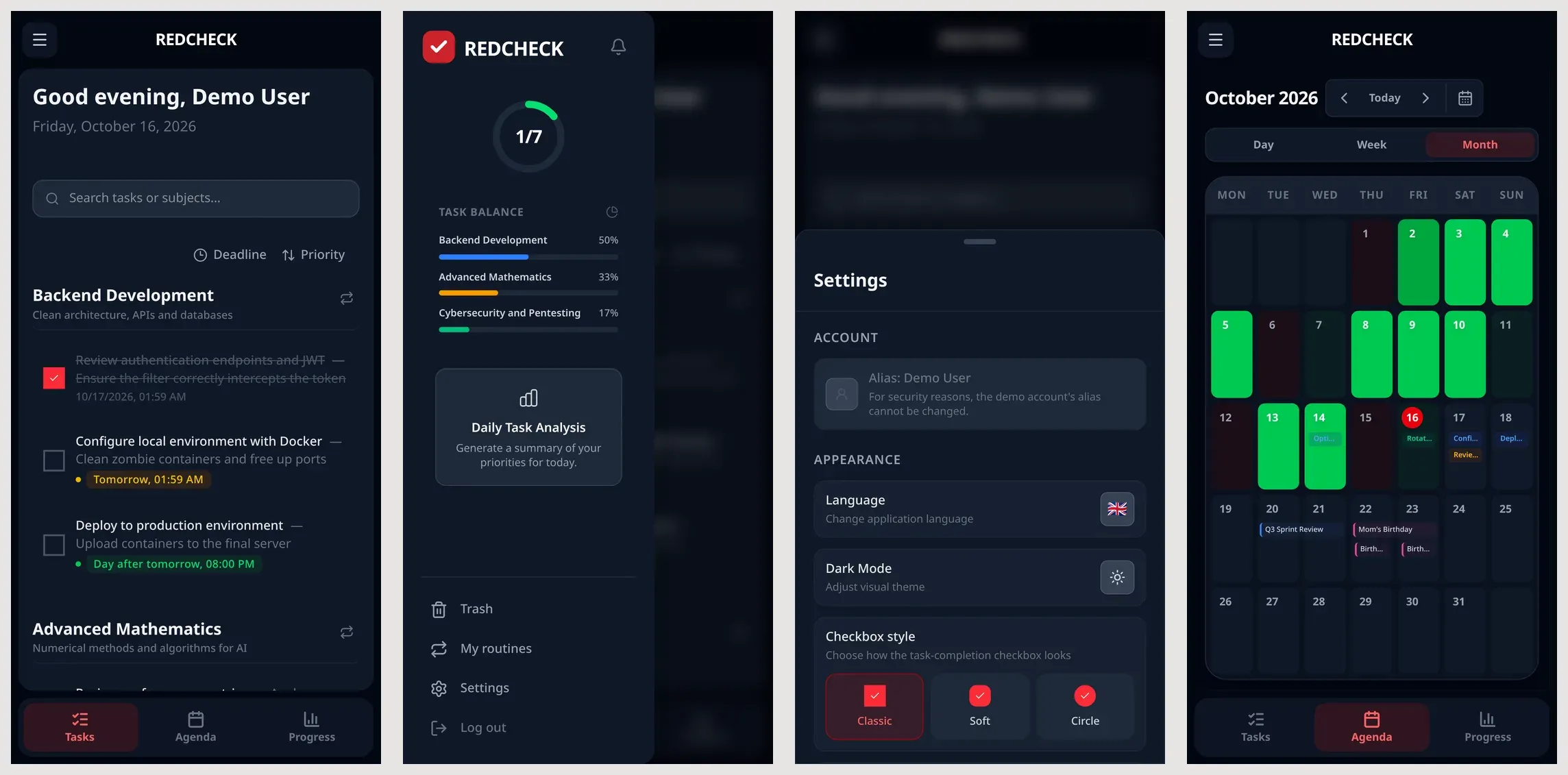
So that’s what RedCheck became (part 15): a web app manifest, home-screen shortcuts, an icon badge with your pending tasks, bottom sheets, swipe to complete or delete, long-press to select. The trade-off is reach versus capability: it runs everywhere, but some things native apps get for free are harder. Which leads to the second line.
Push notifications became reminders
“Alerts for tasks about to be due” sounds like one feature. It’s really two. Showing a notification while the app is open is easy. Reaching you when it’s closed needs a service worker, VAPID keys and a backend that decides when to send each message and to whom.
I shipped the first half and labelled it honestly: while RedCheck is open, in a tab or installed, it checks every minute for tasks due in the next 30 minutes and shows a notification. Real push is still a project of its own. There’s also an option that didn’t exist in June: since the password-reset work (part 13), RedCheck can send email reliably, and an email reminder doesn’t need a service worker at all.
Cron became a restricted cron
The plan said “complex, custom patterns”. Cron can express almost anything, so storing arbitrary cron expressions looked like the obvious engine.
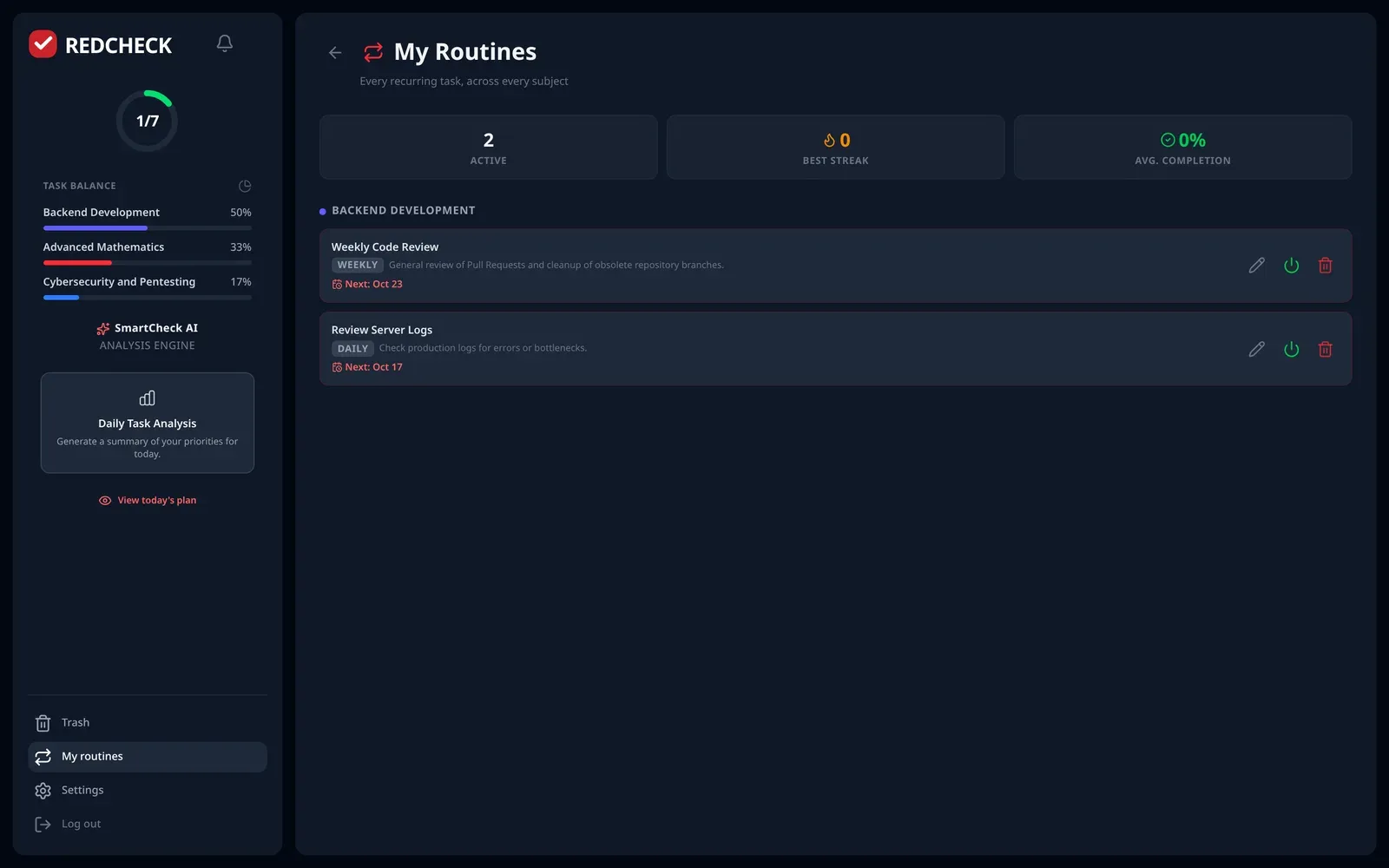
When I actually built custom routines
(part 14), the problem wasn’t expressing the
patterns, it was editing them. Nobody wants to type 0 0 0 * * MON,THU.
A routine has to be editable through checkboxes, and if the database can
hold any cron expression, some of them can never be turned back into
checkboxes. So RedCheck stores cron, but only one exact shape of it,
validated on the way in: specific weekdays. The flexible version would
have been easier to build and impossible to use.
And one pattern doesn’t use cron at all. “The last day of the month” has no operator in Spring’s cron implementation, and the naive “day 31” rule silently skips seven months a year. That case is handled by hand.
Preventive AI is still coming, and closer than it looks
The fourth line hasn’t shipped. The Risk analysis card in the sidebar still says “Coming soon”, as it has since the first version of SmartCheck (part 4).
But the plan got one thing wrong, and finding out why moved it forward. It said the AI would predict bottlenecks from the history of daily performance: the heatmap. The heatmap is the wrong data. Each day is stored as a single snapshot, a percentage, and that number has forgotten which tasks were late, which subjects they belonged to and by how much (part 2). You can see that a week was bad. You can’t see why.
The right data appeared almost by accident. When SmartCheck moved into its own service and I found that its memory had never been written (part 11), the fix was to record the outcome of every task. Today the engine keeps, for each subject, the completion rate, the average delay in days and how often you follow the order the AI suggested. That’s exactly what a preventive warning needs: “your tasks in this subject usually finish two days late, and three of them are due this week”. The card is still a placeholder. The hard part under it no longer is.
What I took from this
- A roadmap names destinations. Constraints choose the route. Three of four lines shipped, and every one of them turned into something smaller, more specific and more usable than the sentence that described it.
- “Native app”, “push notifications” and “cron” were descriptions of solutions, not problems. The problems were: feel at home on a phone, don’t let deadlines sneak up, support real routines. Solving those led somewhere else.
- The item that didn’t ship was blocked by having the wrong data, not by a lack of time. The right data showed up while I was fixing something else entirely.
I’ll write the next list now, knowing it will age the same way.
A principios del verano, con RedCheck recién salida a producción (parte 6), apunté lo que vendría después. Cuatro líneas, cada una con una frase de descripción:
- Una app móvil nativa: clientes para iOS y Android que reutilizan la API REST.
- Notificaciones push: avisos de tareas a punto de vencer.
- Expresiones cron: un motor para patrones de repetición complejos y personalizados.
- IA preventiva: predecir atascos a partir del historial de rendimiento diario.
Estamos en octubre. Mirar esa lista ahora es más interesante de lo que esperaba, porque casi todo lo que había en ella ha pasado, y casi nada ha pasado como estaba escrito.
| Planeado en junio | Lo que pasó de verdad |
|---|---|
| Apps nativas para iOS y Android | Una web instalable con gestos nativos |
| Notificaciones push | Recordatorios mientras la app está abierta |
| Expresiones cron arbitrarias | Un cron restringido a propósito, y un caso a mano |
| IA preventiva a partir del mapa de calor | Aún sin construir, pero sus datos ya existen |
Una app nativa se convirtió en una web que se siente nativa
El plan daba por hecho que “móvil” significaba nativa. La API REST ya estaba separada de la interfaz, así que un cliente nativo parecía el siguiente paso natural: el mismo backend, un frontend nuevo.
Lo que me hizo cambiar de idea fue hacer cuentas. Dos apps nativas son dos bases de código más, dos revisiones de tienda de aplicaciones y cada versión esperando la aprobación de otro. Una aplicación web progresiva es una sola base de código, desplegada en cuanto hago push e instalable desde el navegador.
Así que eso es lo que acabó siendo RedCheck (parte 15): un manifiesto de aplicación web, accesos directos en la pantalla de inicio, un globo en el icono con tus tareas pendientes, hojas inferiores, deslizar para completar o borrar, pulsación larga para seleccionar. El compromiso es alcance frente a capacidad: funciona en todas partes, pero algunas cosas que las apps nativas tienen gratis son más difíciles. Lo que lleva a la segunda línea.
Las notificaciones push se convirtieron en recordatorios
“Avisos de tareas a punto de vencer” suena a una sola funcionalidad. En realidad son dos. Mostrar una notificación mientras la app está abierta es fácil. Llegar hasta ti cuando está cerrada necesita un service worker, claves VAPID y un backend que decida cuándo enviar cada mensaje y a quién.
Publiqué la primera mitad y la llamé por su nombre: mientras RedCheck está abierta, en una pestaña o instalada, comprueba cada minuto si hay tareas que vencen en los próximos 30 minutos y muestra una notificación. El push de verdad sigue siendo un proyecto en sí mismo. Y hay una opción que en junio no existía: desde el trabajo de recuperación de contraseña (parte 13), RedCheck puede enviar correos de forma fiable, y un recordatorio por correo no necesita ningún service worker.
El cron se convirtió en un cron restringido
El plan decía “patrones complejos y personalizados”. Cron puede expresar casi cualquier cosa, así que guardar expresiones cron arbitrarias parecía el motor evidente.
Cuando de verdad construí las rutinas personalizadas
(parte 14), el problema no era expresar los
patrones, sino editarlos. Nadie quiere escribir 0 0 0 * * MON,THU. Una
rutina tiene que poder editarse con casillas, y si la base de datos puede
guardar cualquier expresión cron, algunas nunca podrán convertirse de
vuelta en casillas. Así que RedCheck guarda cron, pero solo una forma
exacta, validada al entrar: días concretos de la semana. La versión
flexible habría sido más fácil de construir e imposible de usar.
Y un patrón no usa cron en absoluto. “El último día del mes” no tiene operador en la implementación de cron de Spring, y la regla ingenua “día 31” se salta en silencio siete meses al año. Ese caso se resuelve a mano.
La IA preventiva sigue en camino, y más cerca de lo que parece
La cuarta línea no se ha publicado. La tarjeta Analizar riesgos de la barra lateral sigue diciendo “Próximamente”, como desde la primera versión de SmartCheck (parte 4).
Pero el plan se equivocaba en una cosa, y descubrir por qué lo hizo avanzar. Decía que la IA predeciría atascos a partir del historial de rendimiento diario: el mapa de calor. El mapa de calor son los datos equivocados. Cada día se guarda como una sola foto, un porcentaje, y ese número ha olvidado qué tareas se retrasaron, de qué asignatura eran y cuánto (parte 2). Puedes ver que una semana fue mala. No puedes ver por qué.
Los datos correctos aparecieron casi por accidente. Cuando SmartCheck se convirtió en un servicio propio y descubrí que su memoria nunca se había escrito (parte 11), la solución fue registrar el resultado de cada tarea. Hoy el motor guarda, por cada asignatura, la tasa de finalización, el retraso medio en días y cuántas veces sigues el orden que propuso la IA. Es exactamente lo que necesita un aviso preventivo: “tus tareas de esta asignatura suelen terminar dos días tarde, y tres vencen esta semana”. La tarjeta sigue siendo un hueco. La parte difícil que hay debajo ya no lo es.
Con qué me quedo
- Una hoja de ruta nombra destinos. Las restricciones eligen el camino. Tres de cuatro líneas se publicaron, y cada una acabó siendo algo más pequeño, más concreto y más usable que la frase que la describía.
- “App nativa”, “notificaciones push” y “cron” eran descripciones de soluciones, no de problemas. Los problemas eran: sentirse en casa en un móvil, que las fechas límite no te pillen por sorpresa, admitir rutinas reales. Resolverlos llevó a otro sitio.
- Lo que no se publicó no estaba bloqueado por falta de tiempo, sino por tener los datos equivocados. Los correctos aparecieron mientras arreglaba algo completamente distinto.
Ahora escribiré la siguiente lista, sabiendo que envejecerá igual.
- Frontend
- Backend
- IA