SmartCheck, primera versión
El asistente de IA de RedCheck empezó como un modelo local que se adueñaba de mi portátil. El paso a una API, sacarle JSON a un LLM y esperar su respuesta sin bloquear a nadie.
Nothing in my notebook could tell me what to do first. On a heavy day, with three subjects and six deadlines, deciding the order was its own small task. AI wasn’t part of the original plan for RedCheck, but by late March the core was working, and that question was the obvious next one: given everything I have pending, what should I do today, and in what order?
That became SmartCheck. This part covers its first version, built in a week between 25 March and 1 April.
Starting local
My first choice was to run the model myself, with Ollama and Llama 3.2 on my own machine. It’s free, nothing leaves your computer, and there’s no API key to manage. For a planner holding someone’s daily tasks, that privacy argument is a real one.
It lasted about a week. Ollama took every resource my laptop had: while it was generating a plan, the rest of the machine crawled. And the laptop was the generous case. RedCheck was always going to run on a very modest server, where a local model would compete for memory and CPU with the backend, the frontend and the database, and lose.
So on 1 April SmartCheck moved to Google’s Gemini API. The trade-off is the mirror image of the one above: tasks now leave the server to be processed by a third party, and every analysis has a cost and a dependency on an external service. In exchange, the server does no heavy lifting at all, and I could stop fighting hardware and focus on what actually mattered: getting good, reliable answers out of the model.
One interface, two providers
The switch took a day because the backend never talked to Ollama
directly. The service that builds the analysis depends on an interface
with a single method, String ask(String prompt), and a configuration
value picks the implementation: ollama or gemini. Moving providers
meant writing GeminiService, making OllamaService implement the same
interface, and changing one line of configuration.
That interface cost almost nothing to add, and it’s the reason the switch was a config change instead of a rewrite.
Getting JSON out of a language model
The interface needed structured data: an ordered list of tasks, each with a reason, plus a risk level and a short message. Language models want to chat. Ask for JSON and you’ll often get “Sure! Here’s your plan:” followed by JSON, which breaks any parser.
Four things together made the output reliable enough:
- Send only what matters. The backend collects the user’s pending tasks and sends just the id, title, description, deadline and subject of each. Fewer fields means fewer tokens, lower latency and less for the model to get distracted by.
- A strict prompt. It casts the model as a productivity analyst, lists explicit ordering rules (overdue first, then due today, then everything else) and spells out the exact JSON structure to return.
- Low temperature. At 0.2, the model picks the most likely tokens almost every time. For this job creativity is a bug: the same tasks should produce the same plan.
- JSON mode. Both providers can be told to return only JSON:
format: jsonin Ollama,responseMimeType: application/jsonin Gemini. That removed the chatty preamble entirely.
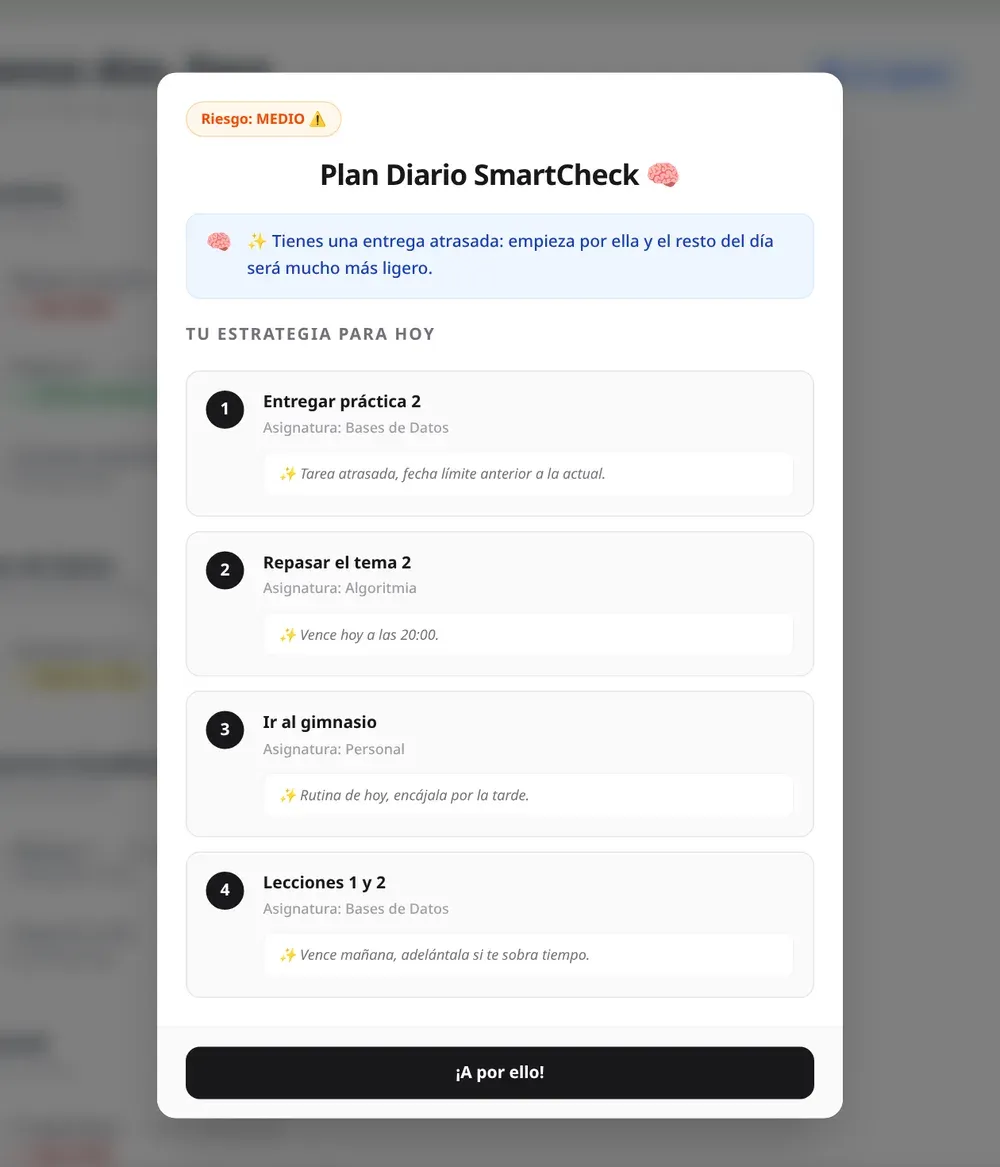
One thing in that first prompt aged badly: it included the current date and asked the model to work out which tasks were overdue or due today, and to pick the risk level by counting them. It mostly worked. Months later, when SmartCheck became its own service (part 11), all of that moved into code, because date arithmetic is exactly the kind of thing a model gets quietly wrong.
Waiting without blocking
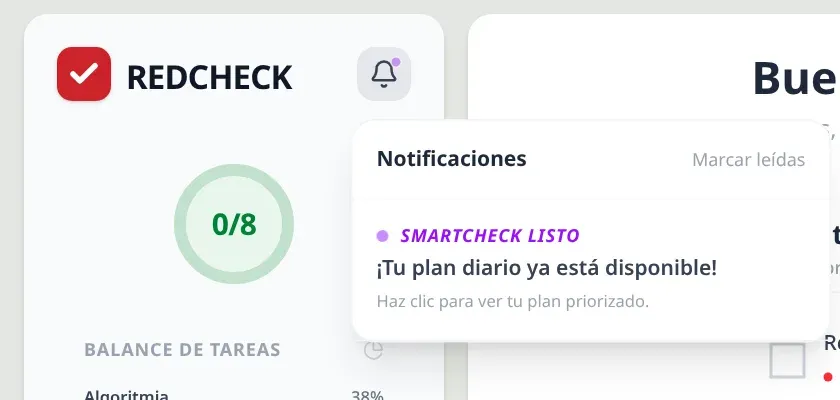
The app warned that a plan “usually takes 15 to 20 seconds”, and the local model was slower than that. Holding an HTTP request open for that long ties up a server thread and makes the interface hang. So the flow is asynchronous:
The request starts the analysis in a background thread (@Async) and
returns immediately. When the plan is ready, the backend stores it and
records a notification. Meanwhile the frontend asks every three seconds
whether today’s plan exists yet, and lights up the bell when it does.
The number of attempts went up twice in the commit history. The local model was slow enough that the original limit kept timing out, and the final value, 60 attempts, allows up to three minutes. Polling isn’t elegant: WebSockets or server-sent events would push the result instead of asking for it. But it’s a few lines of code, it works through any proxy, and for a request a user makes a couple of times a day, it was the right amount of engineering.
A design that stayed on paper
Every analysis leaves a notification row behind. Over time, that’s a table full of “your plan is ready” messages nobody needs, so I designed how to clean it up.
The first idea was a nightly cleanup job. The problem was time zones: a
job scheduled for 3 a.m. runs at 3 a.m. server time, and if the server
isn’t in the user’s time zone, it could delete unread notifications in
the middle of their afternoon. The design I settled on was to delete a
notification when it’s read: the frontend sends a DELETE when you open
it, the table only ever holds what’s still relevant, and there’s no
scheduled job to get wrong.
That’s the plan I wrote down. What actually shipped was simpler still. The backend stored the notifications and exposed them, but the frontend never read them: it already knew when polling found the plan, so it lit the bell itself. Delete-on-read stayed a design, not code. It’s a good reminder that a decision documented is not a decision implemented.
Honest placeholders
The sidebar had a second AI card from the start, Risk analysis, meant to warn about patterns of delay before they become a problem. It never got its logic in this version, and it says so: the card carries a “Coming soon” label. I’d rather show what’s planned and be clear it isn’t there yet than ship a button that pretends.
What I took from this stage
- Local models are great until they share a machine with anything else. Know your hardware before you pick your architecture.
- A one-method interface between your code and the AI provider is the cheapest insurance you can buy.
- Reliable structured output from an LLM is a stack of small measures, not one trick: less input, strict instructions, low temperature, JSON mode.
- And don’t ask the model to do arithmetic you could do in code. It took me a few months to fully learn that one.
The next part closes the beginnings: tests, Docker, and the road from my laptop to a real server.
Nada en mi libreta podía decirme qué hacer primero. En un día cargado, con tres asignaturas y seis fechas límite, decidir el orden era una pequeña tarea en sí misma. La IA no estaba en el plan original de RedCheck, pero a finales de marzo el núcleo ya funcionaba, y esa era la pregunta evidente: con todo lo que tengo pendiente, ¿qué debería hacer hoy, y en qué orden?
Así nació SmartCheck. Esta parte cuenta su primera versión, construida en una semana, entre el 25 de marzo y el 1 de abril.
Empezar en local
Mi primera opción fue ejecutar el modelo yo mismo, con Ollama y Llama 3.2 en mi propio ordenador. Es gratis, nada sale de tu máquina y no hay ninguna API key que gestionar. Para un planificador que guarda las tareas diarias de alguien, ese argumento de privacidad pesa.
Duró una semana. Ollama se comía todos los recursos de mi portátil: mientras generaba un plan, todo lo demás iba a rastras. Y el portátil era el caso generoso. RedCheck iba a acabar en un servidor muy modesto, donde un modelo local competiría por memoria y CPU con el backend, el frontend y la base de datos, y perdería.
Así que el 1 de abril SmartCheck pasó a la API de Gemini de Google. El compromiso es el reflejo exacto del anterior: ahora las tareas salen del servidor para que las procese un tercero, y cada análisis tiene un coste y depende de un servicio externo. A cambio, el servidor no hace ningún trabajo pesado, y pude dejar de pelearme con el hardware para centrarme en lo que de verdad importaba: conseguir respuestas buenas y fiables del modelo.
Una interfaz, dos proveedores
El cambio llevó un día porque el backend nunca habló con Ollama
directamente. El servicio que prepara el análisis depende de una interfaz
con un único método, String ask(String prompt), y un valor de
configuración elige la implementación: ollama o gemini. Cambiar de
proveedor fue escribir GeminiService, hacer que OllamaService
implementara la misma interfaz y cambiar una línea de configuración.
Esa interfaz no costó casi nada añadirla, y es la razón de que el cambio fuera de configuración y no una reescritura.
Sacarle JSON a un modelo de lenguaje
La interfaz necesitaba datos estructurados: una lista ordenada de tareas, cada una con su motivo, más un nivel de riesgo y un mensaje corto. Los modelos de lenguaje quieren charlar. Pídeles JSON y a menudo te darán “¡Claro! Aquí tienes tu plan:” seguido del JSON, lo que rompe cualquier parser.
Cuatro medidas juntas hicieron la respuesta lo bastante fiable:
- Enviar solo lo que importa. El backend recoge las tareas pendientes del usuario y envía solo el id, el título, la descripción, la fecha límite y la asignatura de cada una. Menos campos significa menos tokens, menos latencia y menos cosas con las que distraer al modelo.
- Un prompt estricto. Le asigna el papel de analista de productividad, enumera reglas de orden explícitas (primero lo atrasado, luego lo que vence hoy, luego el resto) y detalla la estructura JSON exacta que debe devolver.
- Temperatura baja. Con 0,2, el modelo elige casi siempre los tokens más probables. Para este trabajo la creatividad es un fallo: las mismas tareas deberían dar el mismo plan.
- Modo JSON. A los dos proveedores se les puede pedir que devuelvan
solo JSON:
format: jsonen Ollama,responseMimeType: application/jsonen Gemini. Eso eliminó por completo el preámbulo charlatán.
Una cosa de aquel primer prompt envejeció mal: incluía la fecha actual y le pedía al modelo que averiguara qué tareas estaban atrasadas o vencían hoy, y que eligiera el nivel de riesgo contándolas. Casi siempre funcionaba. Meses después, cuando SmartCheck se convirtió en un servicio propio (parte 11), todo eso pasó al código, porque la aritmética de fechas es justo el tipo de cosa en la que un modelo se equivoca sin avisar.
Esperar sin bloquear
La app avisaba de que un plan “suele tardar unos 15-20 segundos”, y el modelo local tardaba más. Mantener abierta una petición HTTP tanto tiempo ocupa un hilo del servidor y deja la interfaz colgada. Así que el flujo es asíncrono:
La petición lanza el análisis en un hilo en segundo plano (@Async) y
responde al instante. Cuando el plan está listo, el backend lo guarda y
registra una notificación. Mientras tanto, el frontend pregunta cada tres
segundos si ya existe el plan de hoy, y enciende la campana cuando lo
encuentra.
El número de intentos subió dos veces en el historial de commits. El modelo local era tan lento que el límite original se agotaba una y otra vez, y el valor final, 60 intentos, permite esperar hasta tres minutos. El polling no es elegante: con WebSockets o server-sent events el servidor enviaría el resultado en lugar de esperar a que se lo pidan. Pero son unas pocas líneas, funciona a través de cualquier proxy, y para una petición que un usuario hace un par de veces al día, era la cantidad justa de ingeniería.
Un diseño que se quedó en el papel
Cada análisis deja atrás una fila de notificación. Con el tiempo, eso es una tabla llena de mensajes de “tu plan está listo” que nadie necesita, así que diseñé cómo limpiarla.
La primera idea fue un proceso de limpieza cada noche. El problema eran
las zonas horarias: un proceso programado para las 3 de la madrugada se
ejecuta a las 3 hora del servidor, y si el servidor no está en la zona
horaria del usuario, podría borrar notificaciones sin leer en mitad de su
tarde. El diseño por el que me decidí fue borrar cada notificación al
leerla: el frontend envía un DELETE al abrirla, la tabla solo guarda lo
que sigue siendo relevante y no hay ningún proceso programado que pueda
fallar.
Ese es el plan que dejé escrito. Lo que se publicó fue todavía más sencillo. El backend guardaba las notificaciones y las exponía, pero el frontend nunca las leía: ya sabía cuándo el polling encontraba el plan, así que encendía la campana él solo. El borrado al leer se quedó en diseño, no en código. Es un buen recordatorio de que una decisión documentada no es una decisión implementada.
Huecos honestos
La barra lateral tuvo desde el principio una segunda tarjeta de IA, Analizar riesgos, pensada para avisar de patrones de retraso antes de que se conviertan en un problema. En esta versión nunca tuvo lógica detrás, y lo decía: la tarjeta llevaba la etiqueta “Próximamente”. Prefiero enseñar lo que está planeado y dejar claro que aún no existe que publicar un botón que finge.
Con qué me quedo de esta etapa
- Los modelos locales son geniales hasta que comparten máquina con cualquier otra cosa. Conoce tu hardware antes de elegir tu arquitectura.
- Una interfaz de un solo método entre tu código y el proveedor de IA es el seguro más barato que puedes contratar.
- Una salida estructurada fiable de un LLM es un conjunto de pequeñas medidas, no un único truco: menos entrada, instrucciones estrictas, temperatura baja, modo JSON.
- Y no le pidas al modelo cuentas que puedes hacer en código. Esa me costó unos meses aprenderla del todo.
La siguiente parte cierra los inicios: tests, Docker y el camino de mi portátil a un servidor de verdad.
- IA
- Backend